
Table of Contents#
- Quick Start (Up and Running in 2 Minutes)
- DAW Setup: MPE Expression & 18-Channel Multi-Out Stems
- The Global Header Bar, Preset Browser & Parameter Locks
- Tab 1: Performance, Super-Knobs & Expressive Touch Decks
- Tab 2: Dual Filters, Envelopes & Vintage Analog Drift
- Tab 3: The Five Sound Engines
- Playing Expressive Orchestral & Acoustic Articulations
- Tab 4: 8-Operator FM Synthesis Made Simple
- Tab 5: 11-Stage Multi-Bus Studio Effects
- Tab 6: Modulation Matrix, LFOs & Custom MSEG Curves
- Tab 7: 32-Step Phrase Arpeggiator, Bi-Timbral Split & Motion Seq
- Tab 8: 12-Voice Drums Workstation & Multi-Out DAW Stems
- Four 5-Minute Sound Design Recipes
1. Quick Start (Up and Running in 2 Minutes)#
Installation Locations (Windows & macOS Universal)#
- Windows 10 / 11 (64-bit):
- VST3 Plugin:
C:\Program Files\Common Files\VST3\Charisma.vst3 - Standalone Application: Launch
Charisma.exedirectly for instant live playing without opening a DAW.
- VST3 Plugin:
- macOS 12+ Universal Binary (Apple Silicon & Intel):
- VST3 Plugin:
/Library/Audio/Plug-Ins/VST3/Charisma.vst3 - Audio Unit (AU) Plugin:
/Library/Audio/Plug-Ins/Components/Charisma.component - Standalone Application: Launch
/Applications/Charisma.appdirectly for standalone performance.
- VST3 Plugin:
First-Time Standalone Audio & MIDI Setup#
- Launch
Charisma.exe(Windows) orCharisma.app(macOS) and click ⚙ Options -> Audio/MIDI Settings in the top bar. - Choose ASIO or Windows Audio (Exclusive Mode) on Windows, or CoreAudio on macOS.
- Set your Audio Buffer Size to 64–256 samples and check the boxes next to your MIDI keyboard or MPE controller.
First Sound Check#
- Play a chord on your MIDI keyboard — or click directly on the Expressive 2D Keyboard along the bottom of the window.
- Turn the four large Performance Super-Knobs (
Macro 1–4) on Tab 1 (PERFORMANCE) to hear the sound morph in real time. - Click the Preset Bar in the top header to browse all 1,113 factory presets across 26 categories.
License Activation & 15-Minute Trial Mode#
- 15-Minute Per-Session Trial: Before activating, Charisma runs in Trial Mode (
[Trial • 15:00]in the top header) with full access to all 5 sound engines, the 12-voice Drums Workstation, all 11 studio effects, 18-channel DAW stems, and all 1,113 factory presets for 15 minutes per session. After 15 minutes, audio and arpeggiator MIDI output smoothly fade out (restart Charisma or reload your DAW session for a new 15-minute session). Saving custom presets and DAW project patch recall require an active license. - Live Patch Rescue: Dialed in an inspiring sound during a trial session? Activate your license before closing the window — Charisma immediately unmutes and unlocks without losing any of your in-memory tweaks, so you can save your preset or DAW project right away.
- One-Click Online Activation (Up to 3 Computers): Click
[Trial • MM:SS]in the top header (or⚙ Options -> Activate Commercial License...), paste yourCHAR-XXXX-XXXX-XXXXlicense key, and clickActivate Online. Every license includes 3 simultaneous computer activations. Once activated, yourCharisma.charismalicensefile is saved locally and verified 100% offline with zero background internet checks — toggling Wi-Fi, docking laptops, or swapping USB audio interfaces will never interrupt a studio session or live gig. - Offline / Air-Gapped Studio Activation: If your studio computer has no internet connection, click
Copy Machine IDin the License window, visithttps://gapjumper.com/activateon any phone or internet-connected computer to download yourCharisma.charismalicensefile, and drag-and-drop it directly onto the Charisma window (or clickLoad License File). - Moving Seats Between Computers (
Deactivate Seat): Click[Licensed]in the top header (or⚙ Options -> License & Seat Management...) and clickDeactivate Seatto release that computer's slot so you can activate another machine (or clickRemove Local Fileif the computer is offline).
2. DAW Setup: MPE Expression & 18-Channel Multi-Out Stems#
Charisma integrates tightly with Steinberg Cubase / Nuendo, Ableton Live, Apple Logic Pro, Cockos Reaper, PreSonus Studio One, Image-Line FL Studio, and Bitwig Studio, providing host tempo sync, per-note MPE expression, and 18 discreet output channels.
Host Hosting & MPE Expression Setup#
- Ableton Live: Drag Charisma onto a MIDI track, right-click the plugin title bar, and select Enable MPE Mode. Match
MPE Bendon Tab 1 (Card 5, e.g.,48 st) to your controller. - Steinberg Cubase / Nuendo: Insert Charisma on an Instrument Track. Hardware quick-controls auto-map to Timbre, Metal, Bite, Warmth, HPF, LPF, Drift, and Master Volume, and the Key Editor Note Expression lane draws per-note Pitch Bend, Pressure, and Slide curves (
CC#74). - Apple Logic Pro (AU & VST3), Reaper, Studio One, FL Studio & Bitwig Studio: Load Charisma on an Instrument Track with MPE enabled in track/device settings (
2–48 stMPE pitch-bend range on Tab 1). - Host Transport Sync: In DAW plugin mode, Charisma automatically follows your project BPM and meter (
4/4,3/4,5/4,6/8,7/8,12/8) and dynamically redraws bar separators in the Arpeggiator and Drums step grids.
18-Channel Multi-Out DAW Stem Routing (Aux 1–8)#
When mixing inside a DAW, enable Charisma's 8 Stereo Auxiliary Outputs alongside the Main Stereo Out (Ch 1/2) so each drum group hits its own DAW mixer channel:
- Steinberg Cubase / Nuendo: Open the Instrument Track header / VST Instruments rack, click Activate Outputs, and enable
Aux 1 (Kick)throughAux 8 (Cowbell)to create dedicated MixConsole channels. - Ableton Live: Create 8 Audio Tracks, set Audio From to
Charisma, pickAux 1 (Kick)..Aux 8 (Cowbell), and set Monitor to In. - Apple Logic Pro: Instantiate Charisma as Multi-Output (16xStereo) and click the
+icon on the mixer channel strip to revealAux 1throughAux 8. - Cockos Reaper: Insert Charisma and accept the prompt to automatically build multi-channel routing (
Ch 3/4..17/18). - PreSonus Studio One: Expand Charisma's instrument channel dropdown in the Console mixer and check
Aux 1..Aux 8. - FL Studio: Open the plugin wrapper Settings -> Processing -> Connections and map
Aux 1..Aux 8to independent Mixer tracks. - Bitwig Studio: Click Show Multi-Out Channels on the Charisma device header.
3. The Global Header Bar, Preset Browser & Parameter Locks#
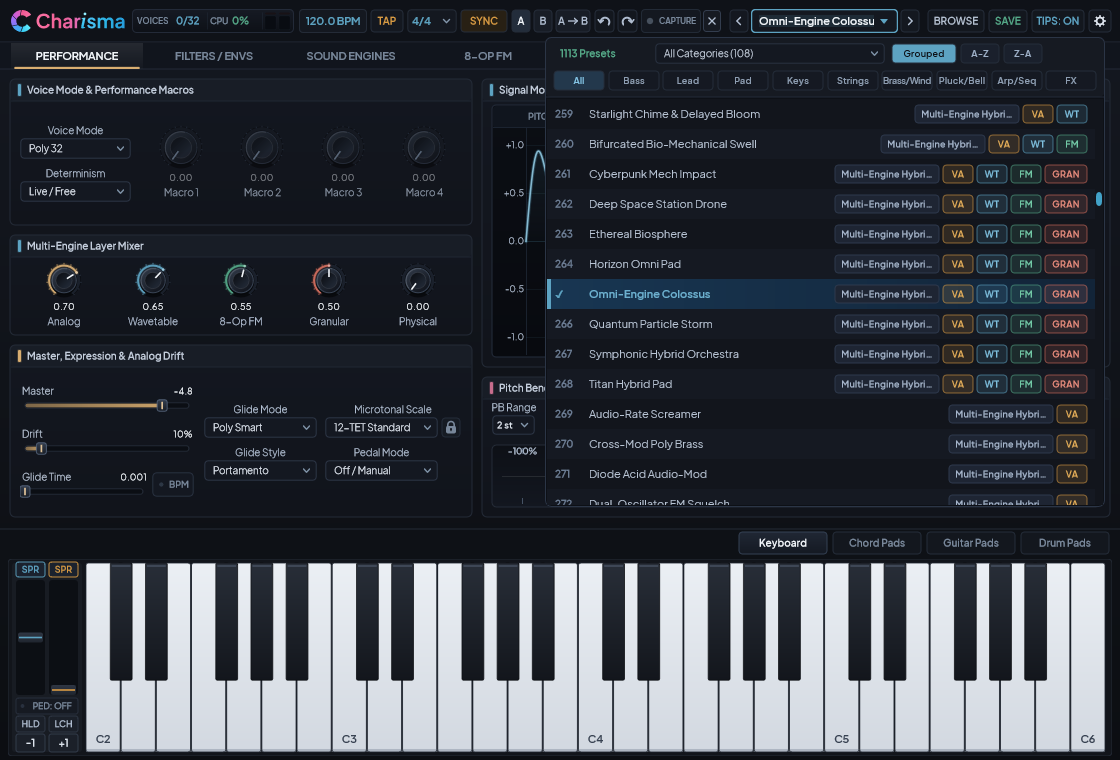
Instant Preset Auditioning & Search#
Clicking the preset name in the top header opens the Full-Screen Preset Browser (BROWSE) or quick dropdown list:
- Single-Click & Arrow-Key Live Audition: Click any preset row — or press your keyboard's
▲and▼arrow keys — to load and audition patches immediately while keeping the browser open so you can test each sound on your MIDI keyboard. PressEnteror double-click a preset to close the browser and keep that patch, or pressEscto close. - Engine & Sequence Badges: Every preset row displays color-coded badges showing which engines power the patch (
VAVirtual Analog,WTWavetable,FM8-Op FM,GRNGranular,PHYSPhysical Modeling, andSEQArpeggiator/Drum Sequence) alongside an instrument category tag (Piano,Strings,Brass,Woodwind,Drum Groove,Bass,Lead,Pad, etc.). - Multi-Word Search, Spotlight & Category Filtering: Type any combination of words in the search box (for example,
bowed cello,country drum,32-step,baroque, orbrass), click theSpotlighttab for flagship curated showcase patches, or click any of the 26 Categories on the left to filter all 1,113 factory presets + your custom user patches instantly. - Sorting Modes: In the top header, toggle
[GROUPED],[A-Z], or[Z-A]to switch between category grouping and strict alphabetical sorting.
The Five Musical Context Locks ([🔒])#
When browsing presets, you sometimes want to keep your current tempo, scale, arpeggio pattern, or drum kit while auditioning new synthesizer sounds. Charisma provides backlit Padlock Buttons ([🔒]):
- Tempo Lock (
[🔒]next to BPM): Keeps your current BPM tempo when switching presets. - Scale Lock (
[🔒]on Tab 1): Preserves your active microtonal scale or custom.scltuning across patch changes. - Note Retrigger Lock (
[🔒]on Tab 1): Locks your preferred same-note retrigger behavior. - Arpeggiator Lock (
[🔒]on Tab 7): Locks the current arpeggiator pattern and settings while you flip through different synth patches. - Drum Kit Lock (
[🔒]on Tab 8): Locks your chosen drum kit sounds while you audition different drum grooves or synth presets.
Hardware Controller Preferences Never Get Overwritten: Your touch-keyboard tracking (
Key X/Y), mouse expression modes, hold/latch toggles, and expression pedal settings are saved globally for your studio rig and are never overwritten when you load presets.
Retroactive MIDI Capture ([CAPTURE MIDI])#
Played a great riff while jamming, even when you weren't recording?
- Charisma continuously records your last 64 bars of live playing in the background.
- Whenever the
[CAPTURE MIDI]button in the top header glows cyan, click it to export your last performance as a standard.midfile — or drag the[≡ DRAG]pill directly into your DAW timeline!
Real-Time Signal Monitor ([ SCOPE | SPECTRUM | SPECTROGRAM ])#
The top-right display in the header bar lets you toggle between three real-time visualizers:
SCOPE: Phase-locked stereo waveform oscilloscope.SPECTRUM: High-resolution frequency analyzer showing bass weight, midrange formants, and high-frequency air.SPECTROGRAM: Scrolling waterfall heat-map showing how overtones and rhythms evolve over time.
License Status Pill ([Licensed] / [Trial • MM:SS])#
Next to the Options menu (⚙), the status pill shows your remaining evaluation time ([Trial • MM:SS] / [Trial Expired]) or [Licensed]. Click it at any time to activate a key, load an offline .charismalicense file, copy your Machine ID, or manage your 3-computer seat allocation (stored locally at %APPDATA%\Gapjumper\Charisma\Charisma.charismalicense on Windows or ~/Library/Application Support/Gapjumper/Charisma/Charisma.charismalicense on macOS). See License Activation & 15-Minute Trial Mode above for details.
4. Tab 1: Performance, Super-Knobs & Expressive Touch Decks#
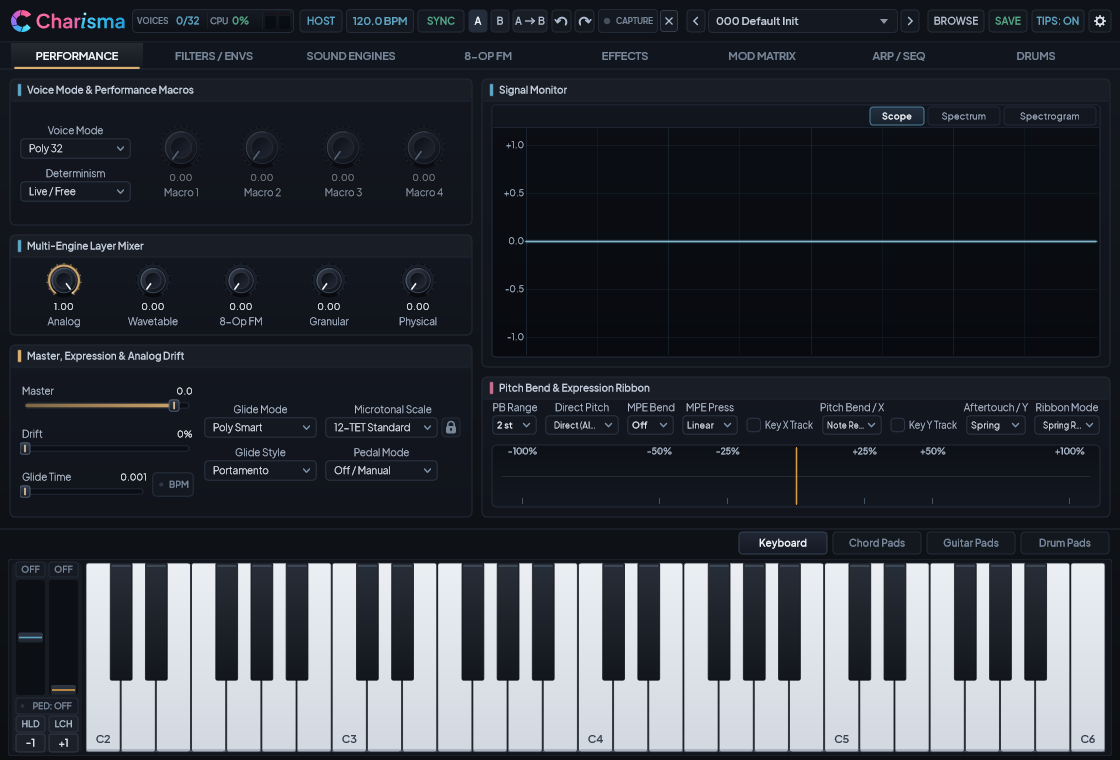
Tab 1 (PERFORMANCE) is your live playing command center:
1. The Four Performance Super-Knobs (Macro 1–4)#
Every factory preset pre-wires Macro 1 (TIMBRE), Macro 2 (SPACE / FX), Macro 3 (MOTION), and Macro 4 (TONE / BITE) to multiple internal parameters at once. Turning a single Super-Knob can simultaneously open filters, deepen FM modulation, swell orchestral bow pressure, and expand reverb space.
2. Voice Mode, Poly Smart Glide & Tactile Ribbon#
- Voice Modes: Choose between Poly 32, Poly 16, Poly 8, Mono Legato (smooth single-voice slides when notes overlap), Mono Retrigger, and Unison 4x Detuned.
- Poly Smart Glide: Even in full polyphonic mode, Charisma can smoothly glide whole chords from one voicing to the next by automatically pairing each new chord note with the nearest previous pitch.
- Tactile Ribbon Controller & Return Mode: Swipe across the bipolar Vintage Poly Expression Ribbon above the keyboard to sweep pitch or any Modulation Matrix target, and choose between Spring, Latch, or Snap return behavior.
3. Global Microtonal & Historical Tuning Engine#
Select from 12 built-in scales (12-TET Standard, 19-EDO Equal Temperament, 24-EDO Quarter-Tone, 31-EDO Fokker Organ, Just Intonation 5-Limit, Pythagorean 12-Tone, 1/4-Comma Meantone, Bohlen-Pierce Scale, Harmonic Alpha (78c), Harmonic Beta (63.8c), Javanese Slendro, Balinese Pelog) or click LOAD .SCL / LOAD .KBM to load any custom Scala microtonal tuning file.
4. The Four Bottom Performance Decks#
Switch between four interactive touch surfaces along the bottom of the interface at any time:
[KEYBOARD]: 2D expressive keyboard where sliding horizontally (X) bends pitch or vibrato and sliding vertically (Y) swells filter brightness or breath pressure.[CHORD PADS]: 8 one-finger harmonic chord pads with selectable musical styles (Cinematic, Jazz 9ths, Neo-Soul, Synthwave, Dark Orchestral) and voicings.[STRUMMER]: Interactive 6-string acoustic/electric guitar strummer — hold a chord on the left pads and swipe across the 6 strings on the right![DRUM PADS]: 2×6 velocity-sensitive finger-drumming pads with instant[NORMAL],[FLAM],[ROLL], and[RIM]articulation buttons.
5. Tab 2: Dual Filters, Envelopes & Vintage Analog Drift#
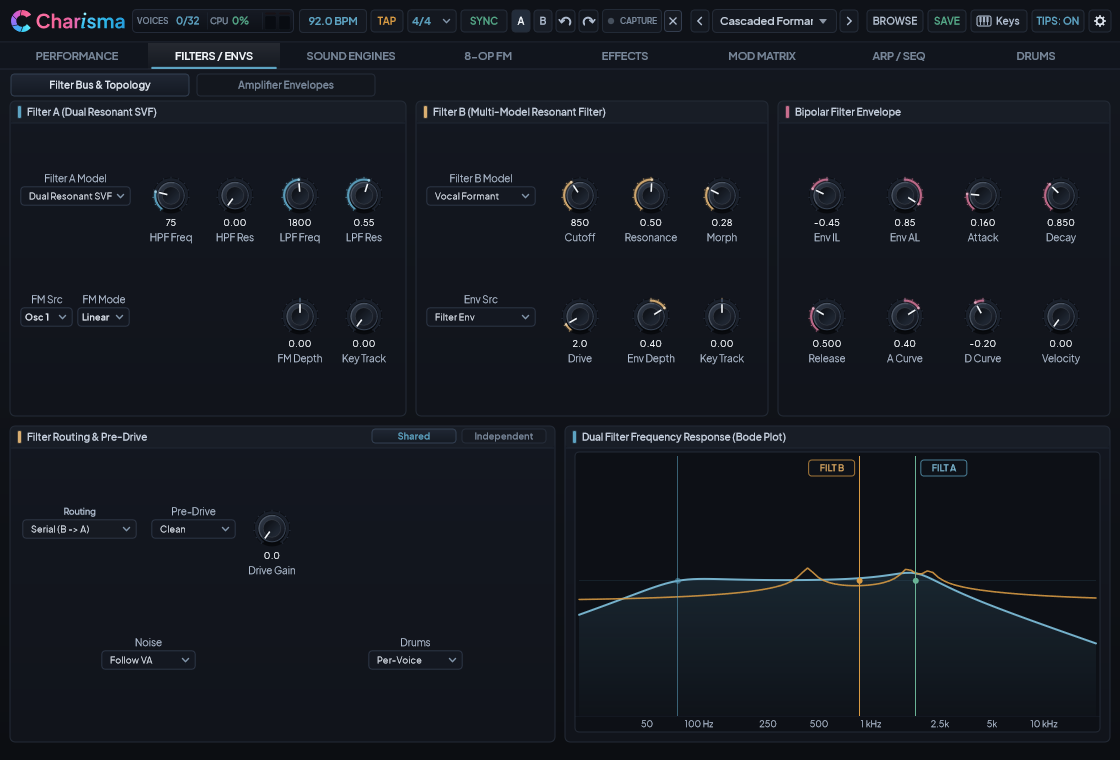
Dual Filter Bus (Filter A & Filter B)#
Charisma pairs a dedicated pre-filter High-Pass Filter (HPF) with two multi-mode resonant filters:
- 6 Filter Routing Topologies:
Serial (A -> B): Classic cascading filter path (great for vocal brass sweeps and deep sub shaping).Serial (B -> A): Routes Filter B's character models into Filter A's smooth ladder/SVF rolloff.Parallel (A + B): Blends both filters side-by-side for dual-formant textures.Split (Per-Engine): Routes each of the 5 sound engines to its own dedicated filter (Filter A,Filter B, orBypass).Filter A Only/Filter B Only: Single-filter focus.
- 7 Filter A Models: Dual Resonant SVF, Transistor Ladder 24dB, Acid Diode 18dB, Resonant Tuned Comb, Bandpass 24dB, Notch 24dB, and Screamer Sallen-Key.
- 14 Filter B Models: Transistor Ladder 24dB, Acid Diode 18dB, Vocal Formant, Resonant Tuned Comb, Bandpass 12dB, Bandpass 24dB, Lowpass 12dB, Highpass 12dB, Highpass 24dB, Notch 12dB, Notch 24dB, Morphing SVF (with continuous
MORPHsweep), Peak Resonator, and Screamer Sallen-Key.
Three Expressive Envelopes#
- Bi-Polar Filter Envelope (
IL - AL - A - D - R): Unlike a standard ADSR, you can set a negative or positive Initial Level (IL) and Attack Level (AL), allowing filters to scoop upward into a note, swell like a brass horn, or dip back down on key release. - Dual Curved Amplitude Envelopes (
Amp Env 1&Amp Env 2): Route different sound engines to different volume envelopes (for example, a sharp plucked attack onAmp Env 1for Physical Modeling, and a delayed, slow-swelling pad onAmp Env 2for Granular or Wavetable usingAMP 2 DELAY).
Vintage Drift (DRIFT)#
Simulates the natural component variations across 32 hardware analog voice cards — adding subtle organic warmth to pitch, filter cutoff, and envelope timing on vintage synth brass and strings, while staying at 0% for clean acoustic pianos, mallets, and percussion.
6. Tab 3: The Five Sound Engines#
Tab 3 (SOUND ENGINES) is organized into three clean subtabs so you can layer up to five synthesis engines at once:
Subtab 1: Virtual Analog ([VIRTUAL ANALOG])#
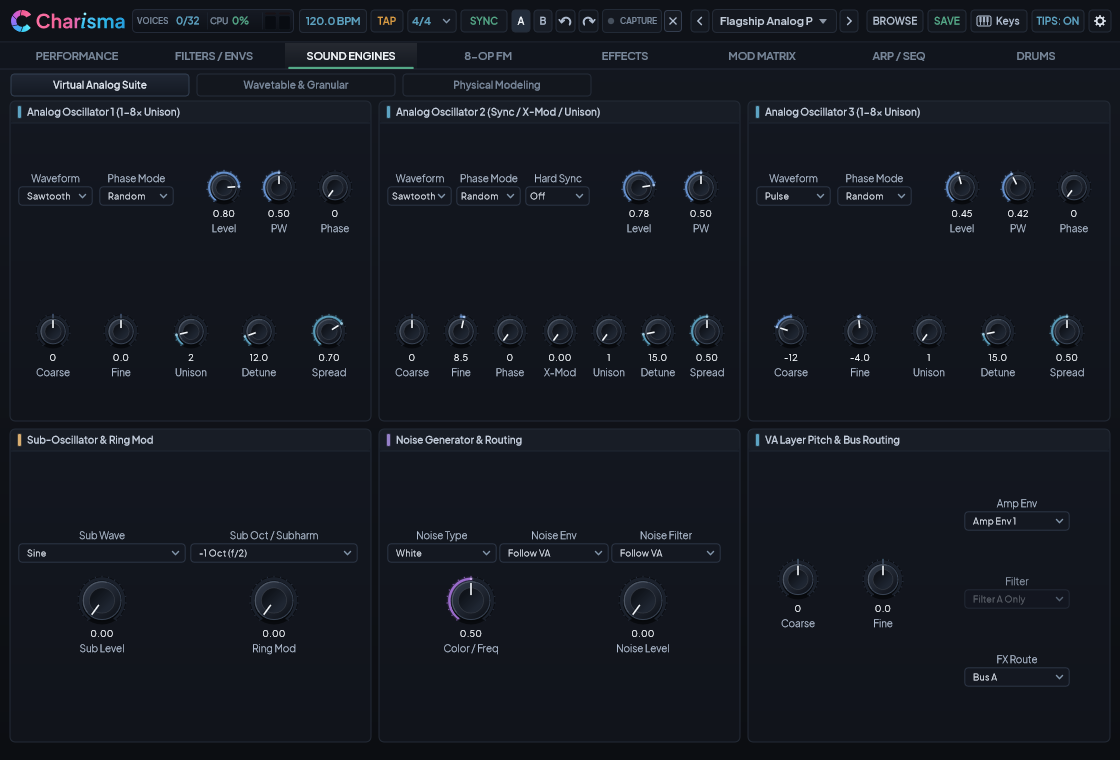
- 3 Band-Limited Oscillators (
Osc 1–3): Saw, Pulse (with PWM), Triangle, and Sine with up to 8× Unison per oscillator, Hard Sync (Osc 1 -> Osc 2), Exponential Cross-Mod (X-Mod), and Ring Modulation. - Fractional Sub-Harmonic Generator: Goes far beyond a standard sub-oscillator with 7 musical divisions:
-1 Oct,-2 Oct,-1.5 Oct (Sub-5th),-2.2 Oct (Sub-3rd),-2.6 Oct,-2.8 Oct, and-3 Oct. - 7-Mode Noise Generator: White, Pink, Brown, Blue, White Bandpass, Pink Bandpass, and Clocked Sample & Hold with its own independent envelope and filter routing.
Subtab 2: Wavetable & Granular ([WAVETABLE & GRANULAR])#
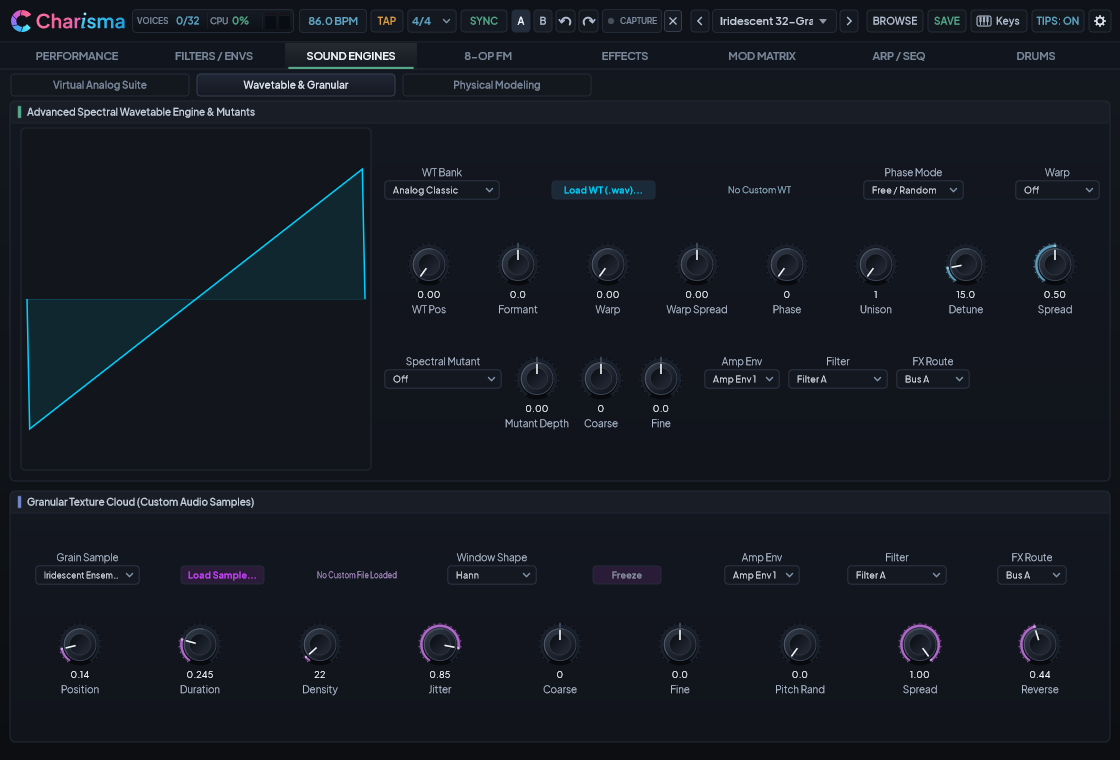
- Spectral Wavetable Engine:
- 9 Banks (8 Built-In Factory Banks + User Custom
.wav): Analog Classic, Spectral Morph, Vocal Formant, Metallic Bell, 80s Organ, Modern Supersaw, Digital Chime, Prismatic Glass, and User Custom (.wav) (drag and drop any.wavfile directly onto the wavetable display). - 6 Phase Warps & 4 Spectral Mutants: Reshape any wavetable in real time with Sync, Bend+/-, PWM, Wavefold, Bitcrush, Odd/Even Partials, Harmonic Stretch, Spectral Invert, and Harmonic Warmth.
- Stereo Warp Spread (
WARP SPREAD): Creates wide binaural stereo movement directly at the oscillator level while staying 100% mono-compatible.
- 9 Banks (8 Built-In Factory Banks + User Custom
- Granular Texture Cloud Engine:
- 7 Sources (6 Built-In Audio Sources + Custom User Sample): Transform Vocal Pad, Cello Bow, Granular Rain, Metal Bell, Vintage Swell, Iridescent Ensemble, or any loaded
.wav/.mp3/.flacfile into a lush cloud of up to 32 simultaneous grains per voice. [FREEZE]Button: Locks the scan position in time to turn any fleeting vocal or instrumental moment into an infinite shimmering pad.
- 7 Sources (6 Built-In Audio Sources + Custom User Sample): Transform Vocal Pad, Cello Bow, Granular Rain, Metal Bell, Vintage Swell, Iridescent Ensemble, or any loaded
Subtab 3: 12-Topology Physical Modeling ([PHYSICAL MODELING])#
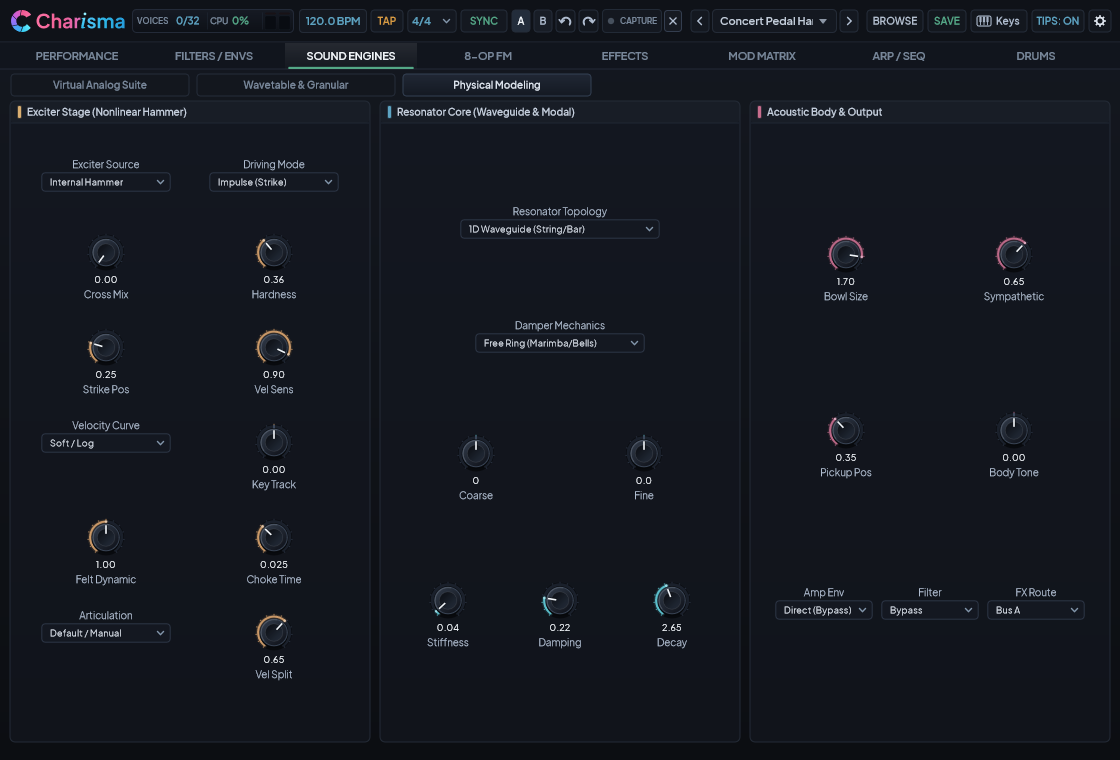
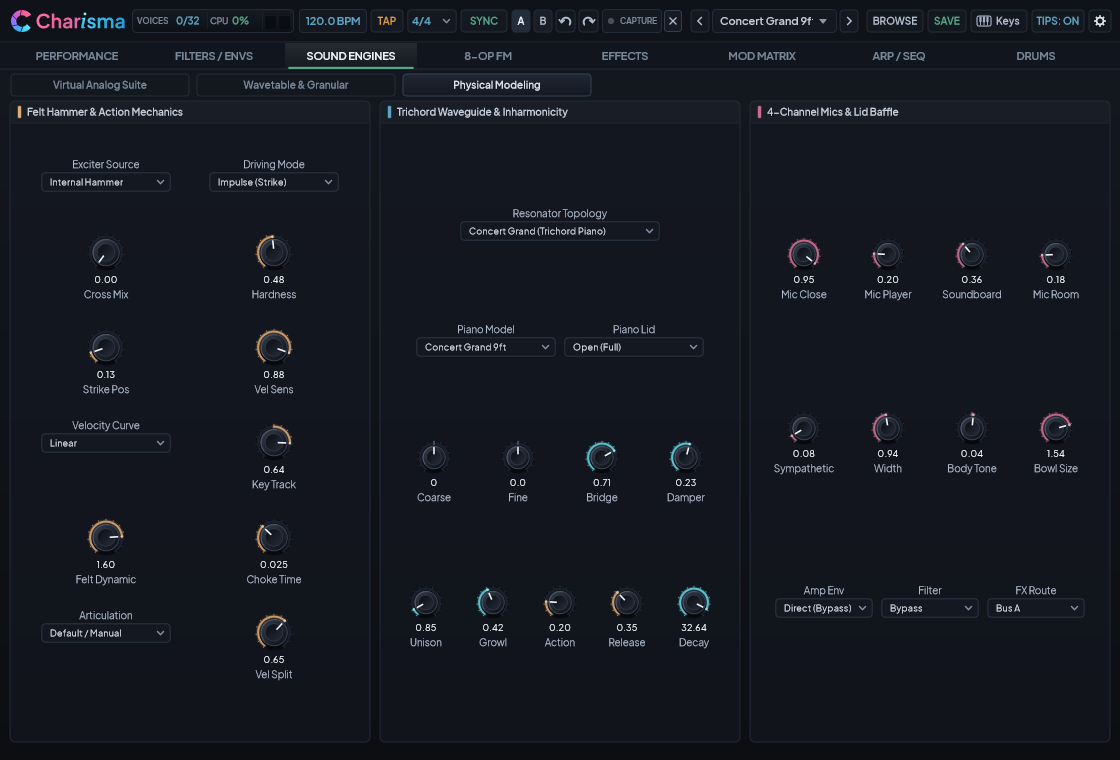
Charisma's Physical Modeling engine synthesizes expressive acoustic and orchestral instruments in real time without static sample loops:
| Topology # | Topology Name | Acoustic Instruments & Sonic Character |
|---|---|---|
| 0 | 1D Waveguide (String/Bar) |
Plucked guitars, harps, harpsichords, clavichords, kalimbas, and struck bars with natural two-stage string decay. |
| 1 | 2D Modal (Membrane/Plate) |
6 Selectable Geometries: 0: Kettle / Membrane Timpani, 1: Gran Cassa Concert Bass Drum, 2: Orchestral Snare / Field Drum, 3: Glockenspiel, 4: Tubular Bells, and 5: Concert Xylophone — plus circular gongs and singing bowls. |
| 2 | Aero Flute (Open Bore / Jet) |
Solo Concert Flute, Orchestral Piccolo, Shakuhachi, and Pan Flute with breath chiff and natural octave overblowing. |
| 3 | Acoustic Reed (Closed Bore) |
Solo Concert Clarinet, Bass Clarinet, Chalumeau, and Duduk with woody odd-harmonic warmth. |
| 4 | Concert Grand (Trichord Piano) |
6 Piano Scale Models: Symphonic Grand 9.5ft (extended sub-bass range down to C0), Concert Grand 9ft, Modern Grand 9ft, Studio Grand 7.5ft, Electro-Acoustic Stage, and Nordic Upright Grand — complete with a 4-Channel Microphone Mixer (Close, Player, Room, Soundboard), 4 Lid Positions, and Sympathetic String Resonance. |
| 5 | Conical Reed (Oboe / Sax / Bassoon) |
Solo Oboe, English Horn, Bassoon, Contrabassoon, Soprano/Alto/Tenor/Baritone Saxophone, and Highland Bagpipe Chanter. |
| 6 | Brass Horn (Lip-Valve) |
Solo Trumpet, French Horn, Tenor/Bass Trombone, Tuba, and Euphonium with high-velocity brass sizzle (Brass Bite). |
| 7 | Suspension Bridge (2D Mesh) |
Tensioned steel cables and structural girders that groan, sway, and physically snap under extreme velocity! |
| 8 | Chaotic FDN (Resonator Matrix) |
Self-exciting resonant matrix for dark cinematic drones and unstable metallic textures. |
| 9 | Bowed String (Violin / Cello / Bass) |
Solo Concert Violin, Solo Viola, Solo Cello, and Solo Bowed Double Bass with expressive bow response, natural rosin texture, and warm wooden body resonance. |
| 10 | Suitcase Tine (Electric Piano) |
Electro-mechanical struck tine bar with asymmetrical magnetic pickup bark, bell chime, and stereo tremolo pan. |
| 11 | Concert Vibraphone (Motor Vanes) |
Precision-tuned aluminum bars with mallet/bow excitation, motor-driven resonant fan vane tremolo, and damper pedal control. |
The Universal Acoustic Resonator Bus (EXCITER SOURCE)
You can feed the output of Virtual Analog, Wavetable, 8-Op FM, or Granular directly into the Physical Modeling resonator (EXCITER SOURCE + CROSS-MIX). Try bowing a Concert Cello body with a morphing Vocal Wavetable, or striking a Timpani membrane with an 8-Op FM bell!
7. Playing Expressive Orchestral & Acoustic Articulations#
On Tab 3 -> Physical Modeling (Card 1), the ARTICULATION MODE dropdown lets you switch playing techniques without sacrificing any keyboard notes to silent keyswitches. Every single one of the 128 MIDI notes remains playable!
| Articulation Mode | Orchestral Woodwinds & Brass (Topologies 2, 3, 5, 6) |
Concert Percussion, Timpani, Snare & Mallets (Topology 1) |
Bowed Strings & Waveguides (Topologies 0, 9) |
|---|---|---|---|
0: Default / Manual |
Natural sustained blowing with delayed vibrato bloom | Follows the Damper toggle (On or Let Ring) |
Follows Impulse (pluck) vs Continuous (bow) |
1: Velocity Split |
Soft playing = smooth sustain; hard strike (> Vel Split) = accented transient |
Soft = damped strike; hard = open ringing accent | Soft velocity (<= Split) = sustained bow; hard strike (> Split) = detached pizzicato pluck! |
2: Legato Bow / Pluck |
Cross-Voice Melodic Legato Slur: Overlapping notes glide smoothly without re-tonguing; detached notes re-articulate cleanly | Detached strike on staccato; smooth connected swell on legato | First note plucks crisply; overlapping legato notes transition automatically into sustained bowing! |
3: Damper Mute (Hit) |
Snappy Staccato: Crisp tongued staccato articulation that releases automatically | Hand/Felt Damping: Damps the drumhead or chime on key release (hold Sustain Pedal CC64 to let ring) |
Tight palm-muted / damped release |
4: Free Ring (Let Ring) |
Sforzando / Accent (ff): Explosive brass/reed attack flare that settles into warm sustain |
Open Uninhibited Ring: Lets tubular bells, glockenspiel, and timpani ring out naturally after key release | Open string ring after release |
5: Mid / Rim Strike |
Dolce / Con Sordino: Warm, veiled harmonic profile for intimate solo passages | Shifts strike toward the rim/edge for brighter overtones | Sul Ponticello / near-bridge bow harmonic focus |
6: Flam (Grace + Hit) |
Double-Tongue / Grace Note: Rapid grace-note ornament leading into the main pitch | Acoustic Flam: Quick grace stroke immediately before the primary mallet or stick hit | Grace-note double pluck / bow articulation |
7: Press Roll (Sustain) |
Flutter-Tongue: Expressive rolled-tongue wind and brass tremor while the key is held | Continuous Mallet / Drum Roll: Sustains a realistic alternating roll while the key or sustain pedal is held (use Mod Wheel CC1 to swell from pp to ff!) |
Continuous tremolo / sustained excitation |
8: Snares Off / Cuivré |
Overblown / Cuivré: Pushes wind/brass into saturated, biting fortissimo overtones | Snares Off (Throw-Off): Disengages bottom snare wires for dry field-drum/tenor tom tone | High-tension harmonic drive |
8. Tab 4: 8-Operator FM Synthesis Made Simple#
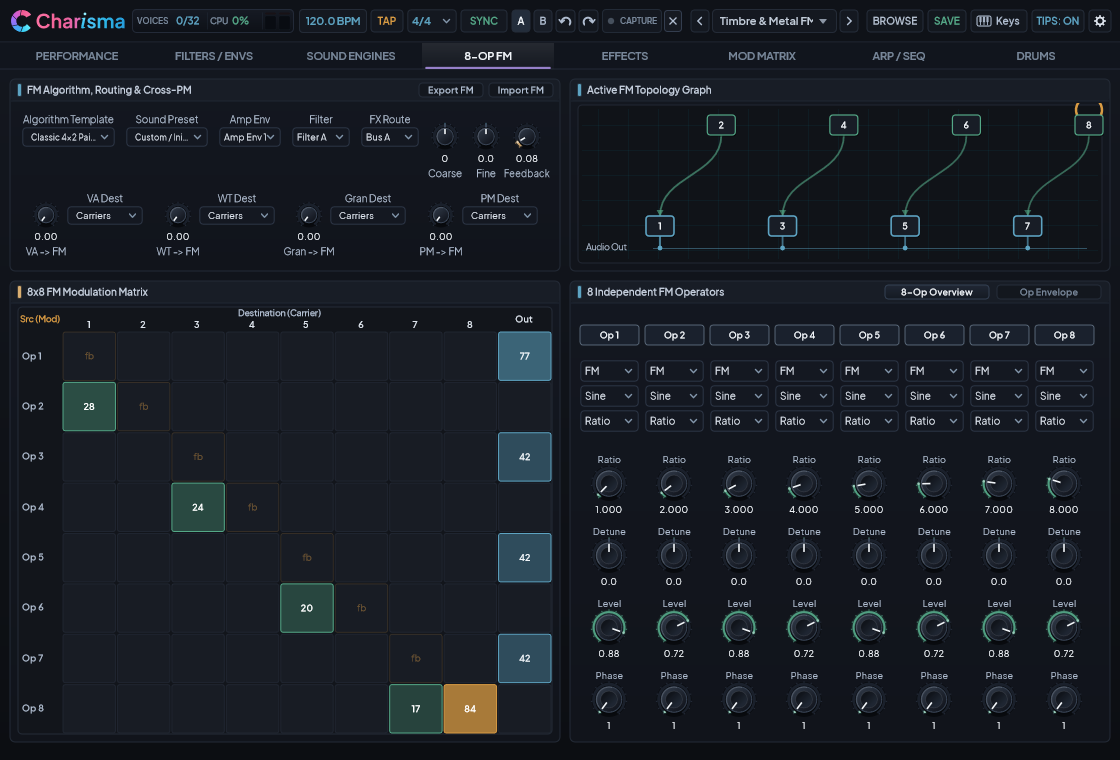
FM synthesis doesn't have to be complicated. Charisma gives you three effortless ways to work with its 8-Operator FM Engine:
- 14 Visual Algorithm Templates + One-Click Operator Sound Presets:
- Pick any of the 14 Algorithms (
Classic 4x2 Pairs,Dual 3-Op Brass,6-Op Club Bass,Branching Bells,8-Op Additive Organ,Formant Vocal Stack,Chaotic Feedback Cluster, etc.) and see the signal flow light up in the interactive Algorithm Graph. - Then pick a ready-made voice from the Operator Sound Preset dropdown to load proven harmonic ratios and envelopes in one click.
- Pick any of the 14 Algorithms (
- The Four FM Macro Knobs:
TIMBRE: Sweeps overall FM brightness from warm sine fundamentals to shimmering harmonics.METAL: Dials in bell-like inharmonic overtones and feedback.BITE: Sharpens the attack transient snap for punchy electric pianos, clavs, and slap basses.WARMTH: Boosts deep fundamental and sub-octave body weight.
- Multi-Mode Operators (
Sine,Wavefolder,Resonant Filter,Ring Mod):- Each of the 8 operators can act not only as an oscillator (
Sine,Saw,Square,Triangle), but also as an inline West Coast Wavefolder, a Resonant Lowpass Filter, or a Ring Modulator right inside the FM matrix!
- Each of the 8 operators can act not only as an oscillator (
9. Tab 5: 11-Stage Multi-Bus Studio Effects#
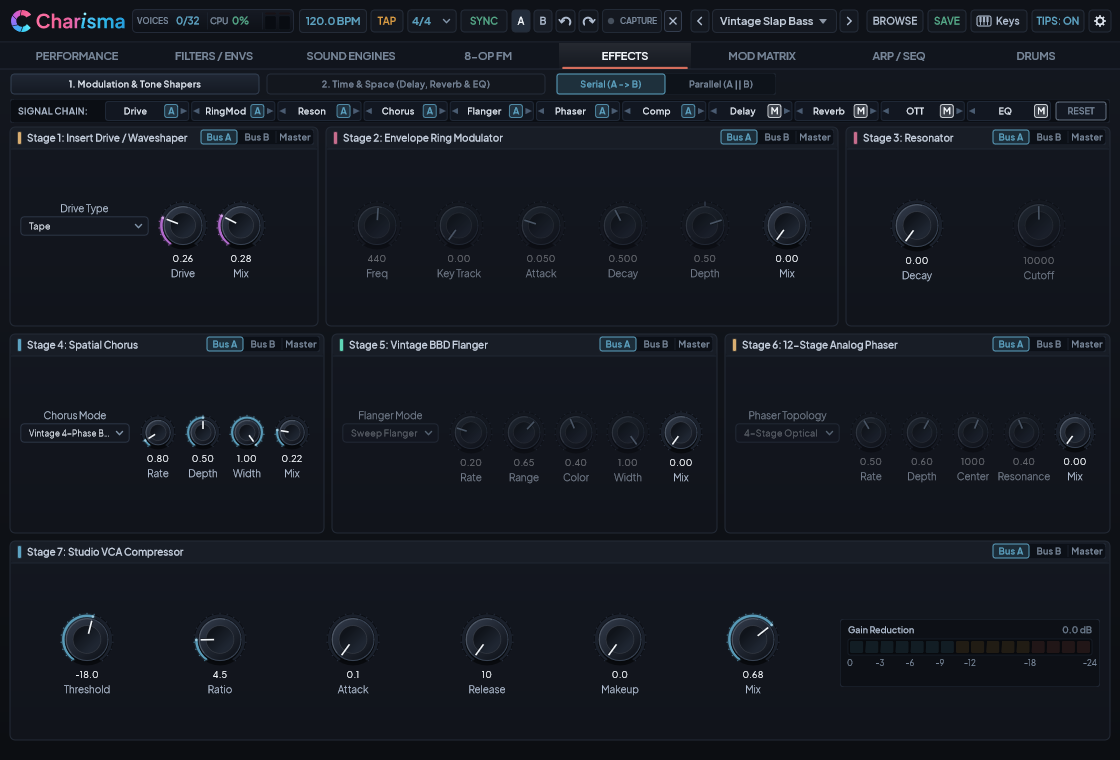
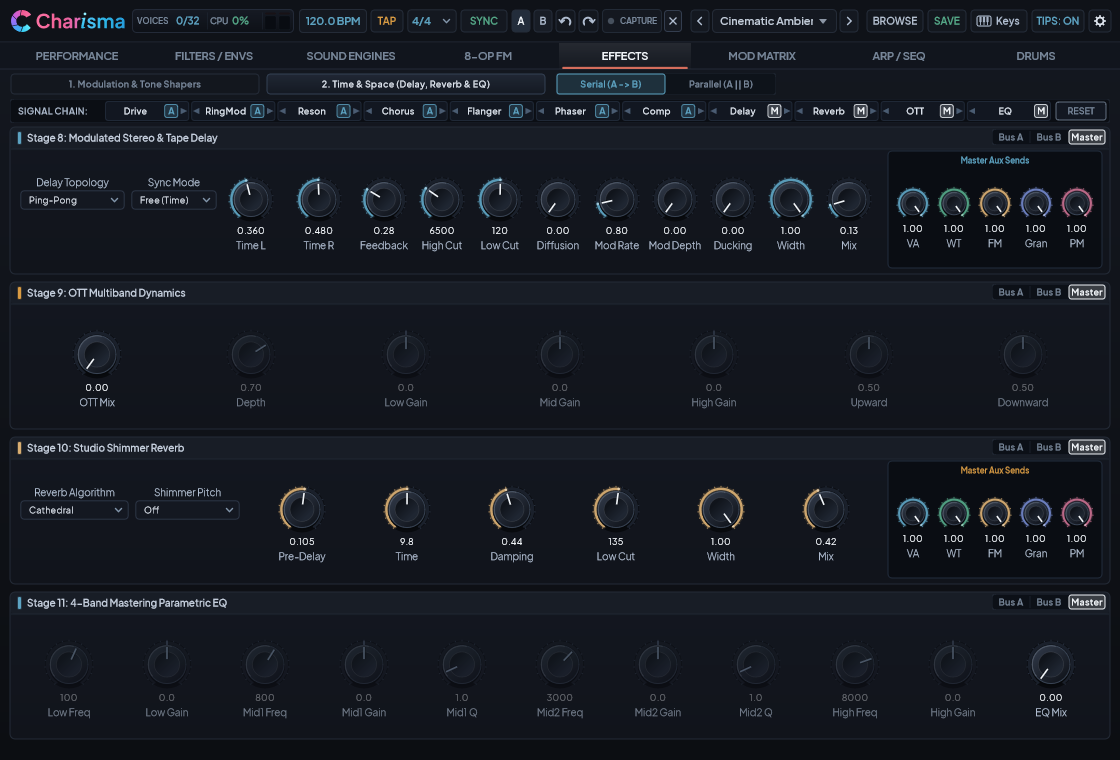
Charisma includes a mastering-grade 11-Stage Studio Effects Rack split across two clean subtabs:
- Subtab 1 — Modulation & Tone Shapers:
- Drive & Amp Suite (9 Models): Tube, Tape, Hard Clip, Bitcrush, Wavefolder, British Stack 100W, American Tweed Combo, Suitcase EP, and Acoustic Piezo DI.
- Envelope-Swept Ring Modulator: Classic pitch-tracking or sci-fi bell multiplier.
- Tuned String Resonator (
PHYS MODEL): Turns any percussive or synth sound into a ringing tuned string or resonant body. - 3-Mode Spatial Chorus: Vintage Poly 4-Phase, Tri-Chorus Ensemble, and Hyper-Spatial Widener.
- Vintage Analog Flanger & Filter Matrix: Classic jet sweep or frozen comb filter matrix.
- 12-Stage Stereo Phaser: Lush analog phase shifting with stereo offset.
- Studio VCA Compressor: Punchy dynamics glue with sidechain-friendly attack and release.
- Subtab 2 — Time & Space:
8. 4-Mode Stereo / Tape Delay (up to 12s): Digital Stereo, Ping-Pong, Analog Echo, and Magnetic Tape with automatic
DUCKING(lowers echo volume while you play notes, then swells up in the gaps) and per-engine Aux Sends. 9. 3-Band OTT Multiband Upward/Downward Compressor: Brings out microscopic acoustic detail and massive modern presence. 10. 5-Mode Studio Shimmer Reverb (up to 70s): Vintage Plate, Hall, Cathedral, FDN Hall, and FDN Plate with pitch-shiftedSHIMMERand per-engine Aux Sends. 11. 4-Band Parametric Mastering EQ: Interactive frequency curve display with Low Shelf, Low-Mid Peak, High-Mid Peak, and High Shelf.
Flexible [ Bus A | Bus B | Master ] Routing & Drag-and-Drop Reordering#
- Every effect card has a
[ Bus A | Bus B | Master ]switch in its header. You can route your Lead Synth to Bus A (with British Stack Drive) and your Acoustic Piano to Bus B (with clean Chorus), while keeping Compressor, Reverb, and EQ on Master! - Drag any stage tag in the top Effect Order Bar left or right to reorder the signal chain on the fly.
10. Tab 6: Modulation Matrix, LFOs & Custom MSEG Curves#
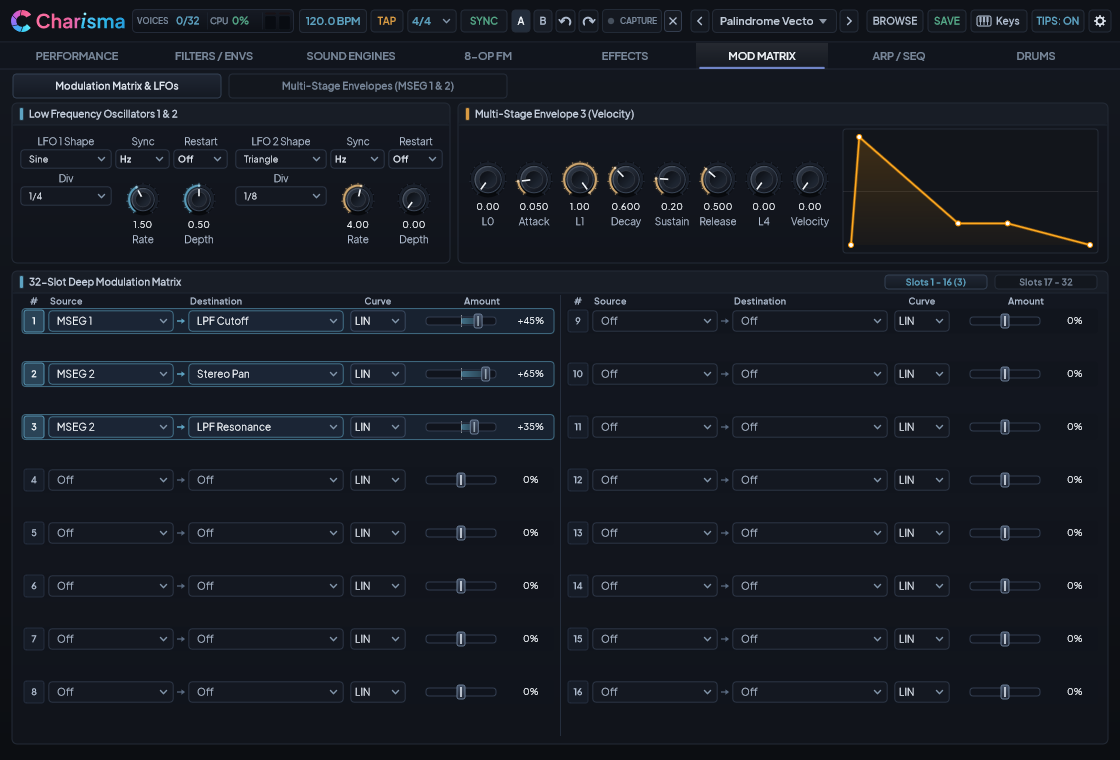
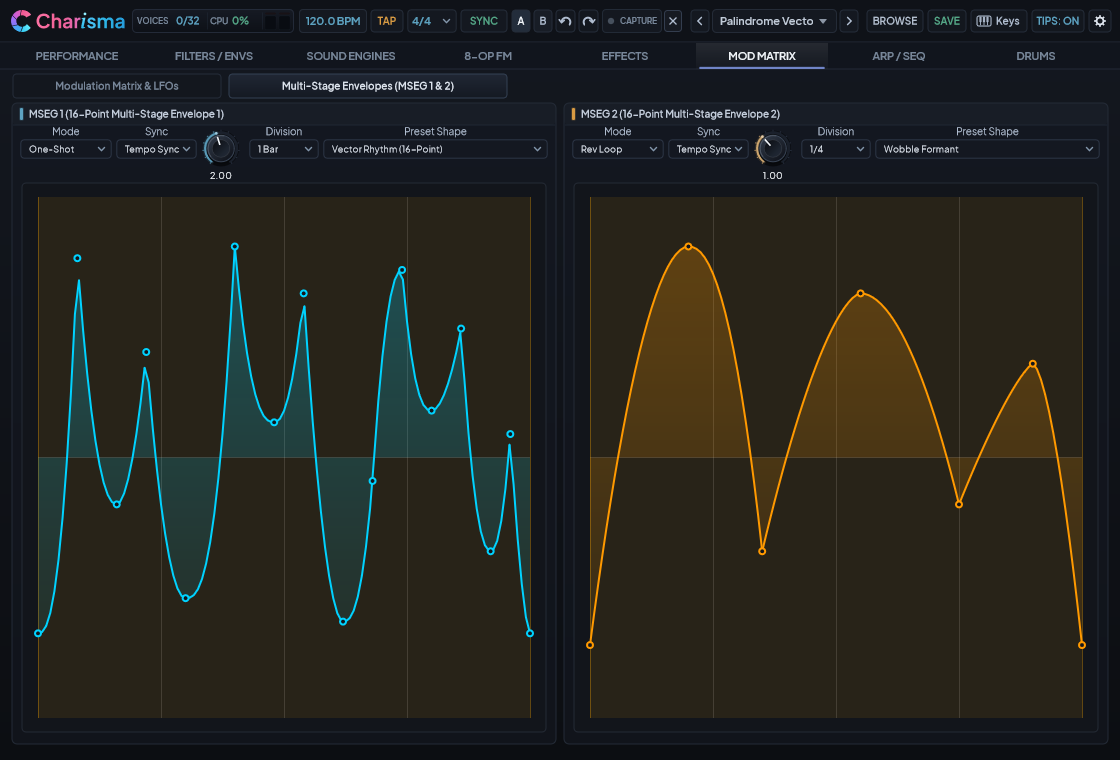
- 32-Slot Modulation Matrix: Connect 30 Modulation Sources (
Off+ 29 active: LFO 1 & 2, MSEG 1 & 2, Motion Seq Lanes 1 & 2, Macro 1–4, Velocity, Key-Track, Aftertouch, MPE Pressure/Slide/Lift, Random Voice, etc.) to 110 Active Destinations with selectable response curves (Linear, Exponential, Logarithmic, S-Curve, and Stepped). - Dual 16-Point MSEGs (
Subtab 2): Draw your own custom looping rhythms, sidechain pumps, or evolving pad swells by dragging nodes on the graphical canvas — or pick from 12 built-in curve templates (Sidechain Pump, 16th Gate, Wobble Formant, Stepped Escalator, Random Smooth, etc.).
11. Tab 7: 32-Step Phrase Arpeggiator, Bi-Timbral Split & Motion Seq#
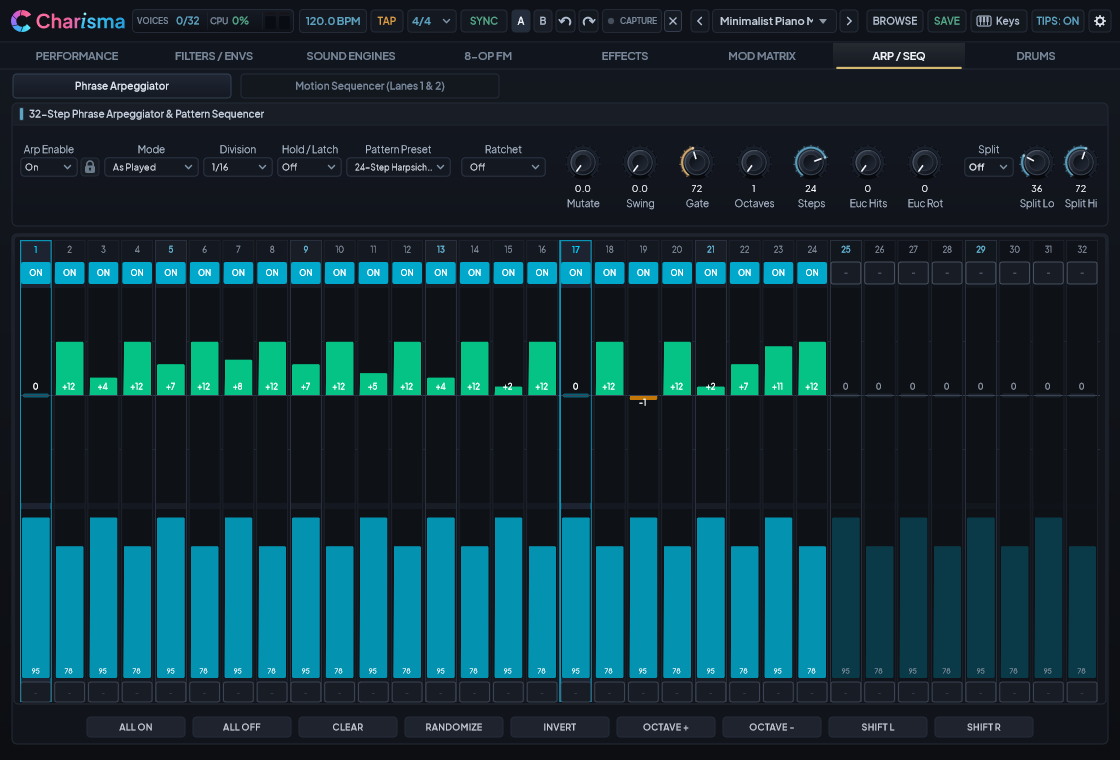
1. 32-Step Polyphonic Phrase Arpeggiator#
- Up to 32 Steps of Multi-Bar Melodic Evolution: Set
STEPSanywhere from1to32steps (including odd meters like14,20,24,28, or30steps). - 32 Curated Factory Phrase Presets: Includes 24 classic 16-step templates (which automatically unlock a musical 2nd-bar turnaround variation when you extend
STEPSpast 16!) plus 8 dedicated multi-bar 24-, 28-, and 32-step flagship sequences:25: Tubular Ostinato 28(evolving 28-step contrapuntal mallet ostinato)26: Balkan 28-Step Rachenitsa(asymmetric 7/16 additive phrase run)27: 32-Step Berlin Cathedral(2-bar evolving analog sequencer)28: 24-Step Baroque Harpsichord(pedal-point harpsichord figuration)29: 32-Step Prog Polyrhythm Solo(alternating 7/8 + 9/8 progressive phrasing)30: 32-Step Afro-Cuban Montuno(syncopated piano/percussion montuno groove)31: 24-Step Country Flatpick Roll(driving 24-step picking pattern)32: 32-Step Avant-Garde Serial(wide-interval modern serial sequence)
- Euclidean Rhythm Generator (
EUCLIDEAN HITS&ROTATE): TurnEUCLIDEAN HITSabove0to automatically distribute rhythmic pulses across your sequence length (for example,5hits over16steps for a Bossa Nova groove, or7hits over16steps for a Brazilian/West African polyrhythm). - Ratchet & Mutate: Add
2x,3x, or4xstep subdivisions (or velocity-triggered ratchets on hard key strikes), and dial upMUTATEfor repeatable, transport-locked melodic variations.
2. True Bi-Timbral Keyboard Split (SPLIT ENABLE)#
Want to hold an arpeggiated bassline in your left hand while playing an expressive, un-arpeggiated solo lead or chord pad in your right hand?
- Turn on
SPLIT ENABLEon Tab 7. - Set
SPLIT LOandSPLIT HIto define the note range that feeds the Arpeggiator (for example,C1toB3for a left-hand bass zone). - Any notes played outside that window (
C4and above) bypass the Arpeggiator completely and play freely in real time!
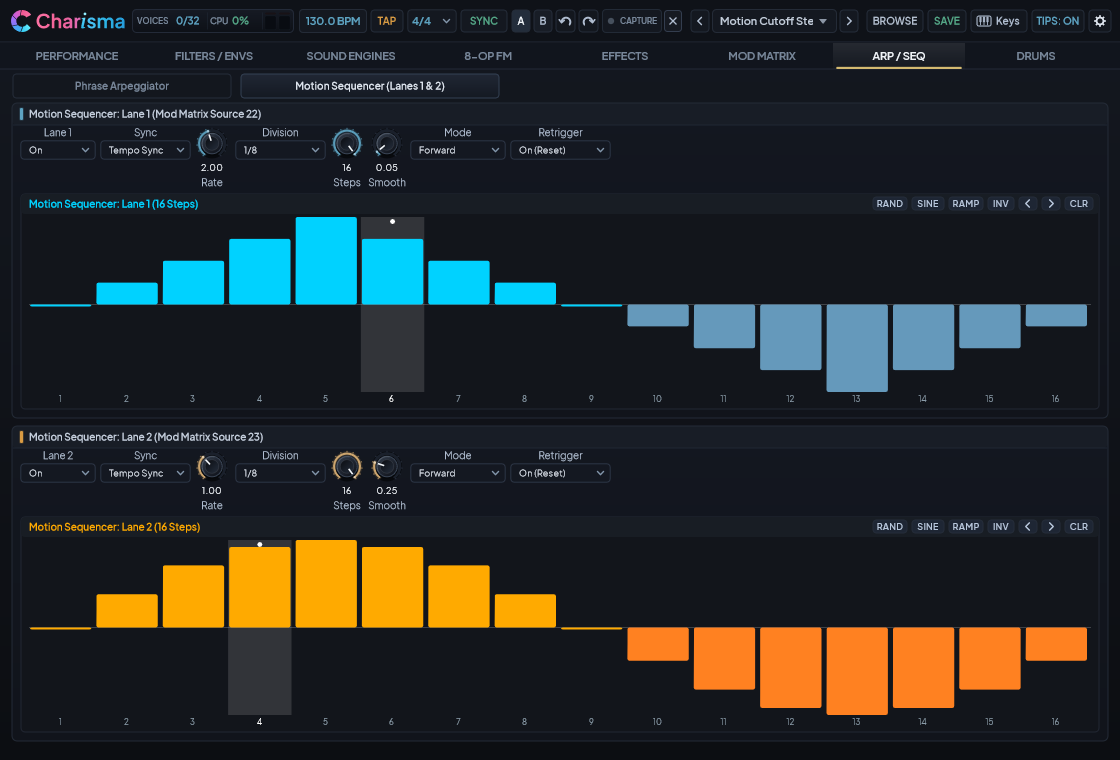
3. Dual 16-Step Motion Sequencer (Subtab 2)#
Paint rhythmic filter sweeps, stereo pan bounces, wavetable scans, or pitch steps across two independent 16-step automation lanes (Motion Seq 1 & Motion Seq 2), complete with one-click [SINE], [RAMP], [RAND], and SMOOTH glide controls.
12. Tab 8: 12-Voice Drums Workstation & Multi-Out DAW Stems#
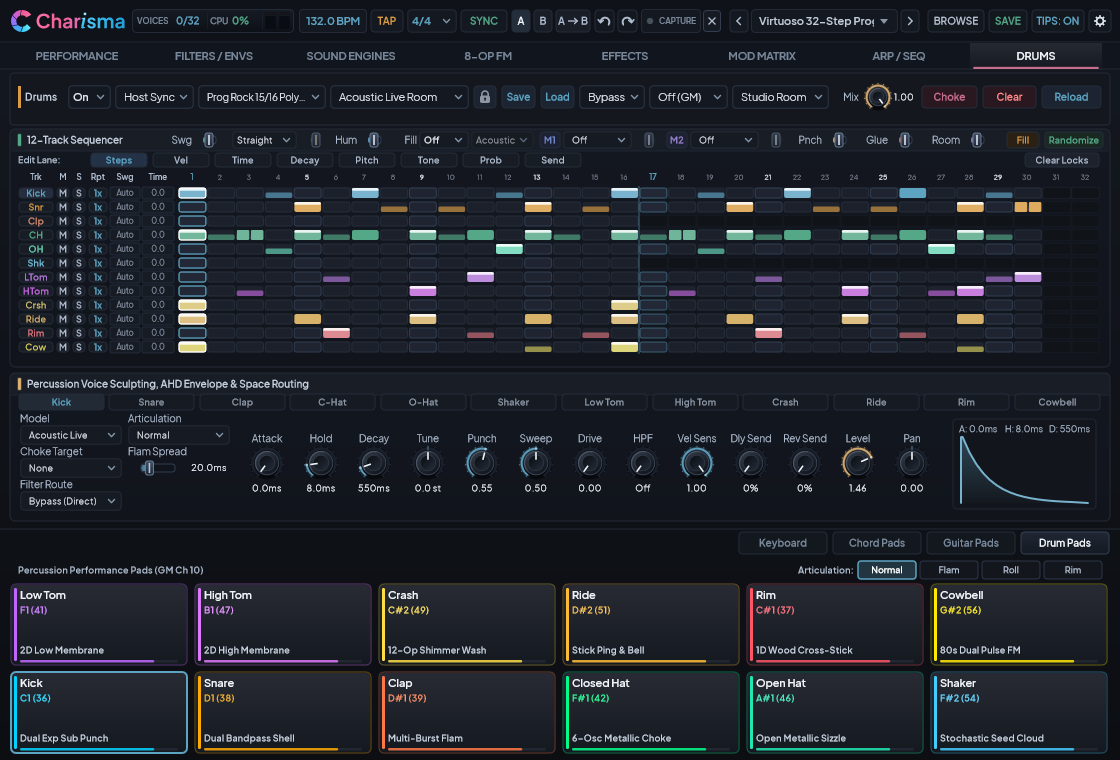
Tab 8 (DRUMS WORKSTATION) is a complete 12-voice percussion synthesizer and 32-step polymetric groove machine built right into Charisma:
1. 12 Autonomous Drum Voices, Expressive Cymbal Modeling & Natural Decay Shaping#
Every one of the 12 voices (Kick, Snare, Clap, Closed Hat, Open Hat, Shaker, Low Tom, High Tom, Crash, Ride, Rim / Wood Block, and Cowbell / Aux) spans 73 zero-allocation synthesis models (4 to 7 models per voice) — combining classic analog drum machines, electronic percussion, newly calibrated Acoustic Live (22" kick, 4-zone radial snare & rimshots, coupled 10"/12"/14"/16" dual-head toms & steel counterhoops, emergent twin-plate closed/open hi-hats, multi-zone crash/china/splash & Ride A/Ride B cymbals, cross-stick/hoop rim, and Ride B bell), Studio Maple Kick, Snare & Toms, Studio Handclap, Studio Cowbell, Afro-Cuban Hand Drums (Conga / Bongo), Acoustic B20 Bronze Closed & Open Hi-Hats, Jazz Brush Swish, and Jazz Sizzle Ride, alongside orchestral Symphonic Gran Cassa, Orchestral Snare (Wires On/Off), Concert Timpani, Xylophone, Glockenspiel, Tubular Bells, Orchestral Wood Blocks A/B/C, Orchestral Cowbells, and Large/Small Crash & Ride Cymbals.
- Per-Voice Tone Sculpting & Space Sends (
HPF,Dly Send,Rev Send): Each drum voice features a dedicated20–1,000 HzHigh-Pass Filter (HPF) to carve out sub-mud cleanly, plus independent Delay Send and Reverb Send controls. - 4-Mode Hi-Hat Dynamics &
Gated HoldArticulation: Choose between Auto Choke, Continuous CC4, Independent, and Note-Off Gate in the Hi-Hat mode selector, or select the Gated Hold articulation on any voice so held MIDI notes sustain and release cleanly on Note-Off. - 8-Mode Chromatic Pitch-Tracking (
CHROMATIC): Switch out of the standard General MIDI drum map to play melodic Low Tom, High Tom, Dual Toms, Woodblock / Rim, Cowbell / Agogo, Kick Sub-Bass, or a Multi-Zone Split chromatics directly across your keyboard. - Natural Acoustic Decay Control (
DECAY&HOLD): On physically modeled drum voices, turning theDECAYorHOLDdial shapes how long the drumhead, bar, or cymbal rings out naturally rather than abruptly gating the sound. RaisingATKabove0 mscreates a smooth percussive swell, while hi-hat and cymbal choke groups damp the ringing voice smoothly. - Continuous Cymbal Restrike Response (
Voice 9: Crash&Voice 10: Ride): Rapid strikes on the same Crash or Ride cymbal interact with the already-ringing cymbal rather than triggering disconnected sample layers — letting repeated ride patterns and crash swells build naturally with realistic stick definition and smooth sustain. - Selecting Acoustic & Orchestral Cymbals, Bells & Wood Blocks:
- Crash (
Voice 9):Bronze B20selects the Large 18" Orchestral Crash (with 36" Symphonic Gong morph onSweep);Dark Trashselects the Small 15" Fast Crash;Acoustic Crash,Acoustic China, andAcoustic Splashselect emergent-physics live studio cymbals. - Ride (
Voice 10):Dark Ride & Bellselects the Large 22" Concert Ride;Pure Bell / Cupselects the Small 20" Studio Ride;Jazz Sizzleadds a riveted vintage jazz wash;Acoustic Ride AandAcoustic Ride Bprovide multi-zone tip/bow/bell/edge studio rides. - Rim & Wood Blocks (
Voice 11):Hollow Woodblocksweeps across Wood Block A (Low), Wood Block B (Medium), and Wood Block C (High) viaTUNEwith soft Felt Beater vs. hard Wood Beater velocity crossover;Acoustic Rimmodels live cross-stick sidestick and counterhoop rim clicks (Rimarticulation or highTone). - Cowbell & Ride Bell (
Voice 12): IncludesStudio Cowbell(tip-to-mouth steel bell viaTone) andAcoustic Bell(dedicated live Ride B bell dome).
- Crash (
- Physical Radial Hit-Position (
Tone) & Velocity Dynamics: Turning a drum voice'sTonedial (or modulating it in the Mod Matrix) morphs where the stick strikes the instrument:- Crash & Ride Cymbals: Sweeps smoothly from Edge Wash (left) through Balanced Bow (center) to Bell / Cup Ping (right).
- Snare & Toms: Morphs from deep center-head fundamental body out toward bright rim overtones and wire snap.
- Cowbell & Wood Block: Sweeps from hollow mouth/slit cavity fundamentals (
0.0) to bright tip/edge metallic clang (1.0).
2. 21 Factory Drum Kits & 48 Multi-Genre Groove Patterns#
- 21 Curated Drum Kits (
KIT PRESET): From 80s Analog Sovereign, 90s Techno Heavyweight, and Modern Club & Trap to Symphonic Concert Hall, Cinematic War Drums, Acoustic Jazz Club, Latin Afro-Cuban, Tribal Bessel Resonator, and the five flagship acoustic/hybrid kits: Studio Maple Live, Afro-Cuban Percussion Ensemble, Vintage Jazz Brush & B20, Modern Hybrid Electro-Acoustic, and Acoustic Live Room. - 48 Factory Groove Patterns (
PATTERN PRESETS): Covers Electronic, Funk, Hip-Hop, World, Orchestral, and four flagship showcase genres:- Country & Americana (
36–38): Country Train Beat 32 (2-bar snare brush train beat with alternating bass & cross-stick turnaround), Outlaw Country Halftime 24, and Bluegrass Flatpick Breakdown 32. - 60s Pop, Soul & Surf (
39–41): 60s Soul Four-on-the-Floor 32 (tambourine + snare driving a classic four-on-the-floor pulse), 60s Symphonic Halftime 32 (booming halftime kick/snare + castanet/shaker ostinato), and 60s Surf Beat 32 (2-bar driving surf beat with 32nd-note tom fill turnaround). - Avant-Garde & Glitch (
42–44): Avant-Garde Prepared 28 (polymetric prepared percussion groove), Avant-Garde Stochastic 32 (32-step ratcheted micro-percussion), and Avant-Garde Spectral Pointillism 24 (metric pointillist accents). - Prog Rock Drum Solos (
45–47): Prog Rock 7/8 Virtuoso Polyrhythm 28 (alternating odd-meter showcase with ride bell syncopation and tom cascades), Prog Rock 15/16 Poly-Metric Solo 30 (asymmetric cross-stick & melodic tom solo), and Prog Rock Stadium Octoban Solo 32 (2-bar virtuoso concert tom, snare roll, woodblock, and bell tree solo).
- Country & Americana (
3. Hands-On 32-Step Sequencer Grid, Step Locks, Groove Feel & Drum MSEG#
- Left-Click Any Step: Cycles through
Off->Normal->Accent(louder punch) ->Ghost(soft grace note) ->Ratchet(rapid roll) ->Off. - Right-Click Any Step: Quickly clears an active step — or inserts a soft Ghost Note on an empty step!
Shift + Left-ClickAny Step: Sets that track's loop length (1..32steps) so different drums can cycle in different time signatures simultaneously (polymeter).- Per-Step Parameter Locks (
StepLock): Edit micro-timing nudge, hit probability, pitch offset, decay scale, ratchet subdivisions, velocity override, choke override, and articulation lock on individual sequencer steps for expressive, non-mechanical phrasing. - Groove Feel (
Groove Feel&Feel Depth), 3-Axis Humanize (Hum) & 5 Fill Styles:- Pick from 6 Groove Feel templates (Straight, Classic 16th, Electro Push-Pull, Funk Laid-Back, Drunk Quintuplet, Triplet Shuffle) and dial in
Feel DepthalongsideSwg(which automatically follows the Arpeggiator's swing when left at0%). - Raise
Hum(0%–100%) to introduce natural drummer variation across strike velocity, stick hit position (subtle edge/bow/bell and center/rim movement), and off-beat micro-timing while keeping the Kick anchored to the grid. SettingHum = 0%(or selectingSyncedin the Determinism menu on Tab 1) locks the groove to exact studio timing. - Set
Auto-Fill(Every 2 / 4 / 8 Bars) and pick any of the 5 Fill Styles (Acoustic, 80s Electro, Rim Stutter, Funk Drop, Club Riser) to drop dynamic turnaround fills automatically.
- Pick from 6 Groove Feel templates (Straight, Classic 16th, Electro Push-Pull, Funk Laid-Back, Drunk Quintuplet, Triplet Shuffle) and dial in
- Dual Drum MSEG Routing (
MSEG 1/2 Target&Depth) & Mod Matrix Expression: Shape multi-bar dynamics directly inside Tab 8 by assigning MSEG 1 and MSEG 2 across 8 dedicated drum targets (Off, Velocity Contour, Hat Openness, Strike Pos Drift, Push/Pull Timing, Hit Kick/Tom Env, Hit Snare/Clap Env, Filter & Space Riser), or route any modulation source in the expanded 110-destination Mod Matrix to per-voice pitch, decay, tone, level, and space sends. - Drum Bus (
Punch | Glue | Room& 3 Room Modes) & High-Resolution DAW Mixdown: Shape the entire drum kit with transientPunch, parallel bus compressionGlue, and stereoRoomambience selectable across 3 Room Modes (Studio Room, 80s Gated, Tight Booth). When exporting or freezing tracks in your DAW, Charisma automatically allows long cymbal and percussion tails to ring out smoothly to silence.
4. 18-Channel Multi-Out DAW Stem Mixing (Aux 1–8)#
When hosted in your DAW, you can enable Charisma's 8 Stereo Auxiliary Outputs alongside the Master Stereo Output so each drum group appears on its own DAW mixer fader (see Section 2 for per-DAW instructions):
- Ch 1/2 (Master): Main Synth + Drum Mix
- Ch 3/4 (
Aux 1): Kick Drum - Ch 5/6 (
Aux 2): Snare & Clap - Ch 7/8 (
Aux 3): Closed & Open Hi-Hats - Ch 9/10 (
Aux 4): Particle Shaker / Tambourine - Ch 11/12 (
Aux 5): Low & High Toms - Ch 13/14 (
Aux 6): Crash & Ride Cymbals - Ch 15/16 (
Aux 7): Rim / Wood Block - Ch 17/18 (
Aux 8): Cowbell / Glockenspiel / Chimes
13. Four 5-Minute Sound Design Recipes#
Recipe 1: Lush 1970s Cinema Brass Swell#
- Load
000 Default Initfrom the Preset Browser. - On Tab 3 (Virtual Analog), set Osc 1 and Osc 2 to Sawtooth, detune Osc 2 by
+8 cents, and set Unison to2x. - On Tab 2 (Filters & Envelopes), raise
HPF Cutoffto140 Hzand setFilter A Cutoffto1,200 HzwithResonanceat0.30. - Set the Filter Envelope to
IL = -0.45,AL = +0.75,Attack = 0.35s,Decay = 1.2s, and raiseVintage Driftto0.75. - On Tab 5 (Studio Effects), turn on Chorus (Vintage Poly 4-Phase,
Mix = 45%) and Reverb (Concert Hall,Time = 4.5s,Mix = 30%).
Recipe 2: Bi-Timbral Split — Left-Hand Synth Bass Arp + Right-Hand Solo Cello#
- Start from
000 Default Initand enable both Virtual Analog (Level = 0.80) and Physical Modeling (Level = 0.85,Topology = 9: Bowed String,Exciter Mode = Continuous). - On Tab 2, set
Filter RoutingtoSplit (Per-Engine). Route VA toFilter A(Amp Env 1, short punchy decay) and PM toFilter B(Amp Env 2, smooth0.18sattack and high sustain). - On Tab 7 (Arpeggiator), turn on
ARP ENABLE, pickPattern 2: 80s Synthwave Bass, turn onSPLIT ENABLE, and setSPLIT LO = C1andSPLIT HI = B3. - Hold a bass note below
B3with your left hand to drive the pulsing bassline while playing lyrical bowed cello melodies aboveC4with your right hand!
Recipe 3: Acoustic Marimba Exciting an 8-Op FM Crystal Bell#
- On Tab 3 (Physical Modeling), select
Topology 1: 2D ModalandGeometry 5: Xylophone / Marimba(Level = 0.75). - On Tab 4 (8-Op FM), select
Algorithm 4: Classic Branching Trees (Bells)(FM Level = 0.55). - Turn up
PM -> FM Depth(0.45) and setPM -> FM DesttoCarriers. The woody mallet transient and rosewood bar overtones now physically phase-modulate the glassy FM bell carriers!
Recipe 4: Custom 7/8 Prog Rock Groove with Drum Kit Lock#
- Open Tab 8 (Drums Workstation), turn on
DRUMS ENABLE, and chooseKit 13: Cinematic War DrumsorKit 14: Acoustic Jazz Club. - Click the
[🔒]Drum Kit Lock icon next to the Kit selector so your kit stays locked. - Open the
PATTERN PRESETSdropdown and select46: Prog Rock 7/8 Virtuoso Solo 28or48: Prog Rock Stadium Octoban Solo 32. - Left-click any step in the 32-step grid to toggle between Normal, Accent, Ghost, and Ratchet hits, and raise
PnchandRoomin the Drum Bus strip for instant studio impact.